


$15.00
Every electronic device or circuit generates heat during its operation. When designing the electronic systems, it is important to check the thermal limits for guaranteed operation otherwise, heat can degrade the performance of the system. The level of heat generated may vary depending on operating power, component density, opponent type, etc., present in the device.
In this course, the Ansys Maxwell Eddy Current solver and electrothermal two-way coupling between Ansys Maxwell and Ansys Icepak will be discussed.
The Maxwell Eddy Current solver computes electromagnetic fields in the frequency domain and assumes steady-frequency AC current as a source of excitation.
Ansys Icepak is a computational fluid dynamics (CFD) solver for electrothermal management (ETM). It provides flow and thermal management solutions for electronic applications.
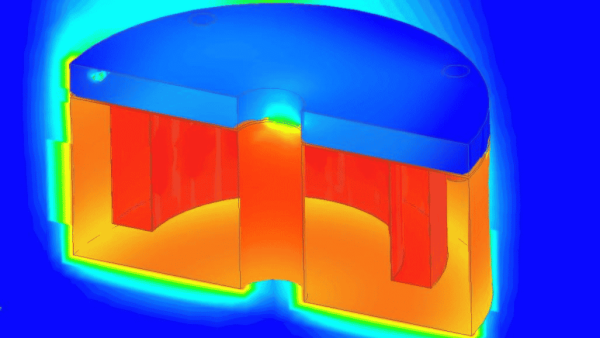
This course starts with the simulation of an electromagnetic brake (EMB) using the Maxwell Eddy Current solver. It also covers the simulation workflow required to perform electrothermal analysis using Maxwell and Icepak inside Ansys Electronics Desktop (AEDT) Student version. Finally we will see the temperature rise in various parts of the EMB by changing the source parameters.
To download Ansys Electronics Desktop Student version for free, click here
A course completion badge allows you to showcase your success. We partner with the Credly Acclaim platform, and digital badges can be used in email signatures, digital resumes and social media sites. The digital image contains verified metadata that describes your participation in our course and the topics and skills that were covered. This badge is for successfully completing the ETM Using Ansys Maxwell and Icepak course.


© 2023 CADFEM SEA Pte Ltd. All rights reserved.


I represent and warrant that either I am of legal age, in accordance with all applicable laws, to access or otherwise use the AIS Site or avail of any Offering in accordance with the Terms, or alternatively, my parent or legal guardian has consented to these Terms.
You may request a refund for this product if you are dissatisfied with your purchase for any reason within fourteen (14) days of purchase to receive a refund in full. Refunds may take up to four (4) business days to process. Refunds will only be provided if you do not use any amount of the Cloud Access purchased; otherwise, there are no refunds provided for the product. Check out our FAQs for more information.
You can request a refund for your badge for upto 15 days after purchase.
Once your refund is processed the badge will disappear from your Credly account and any links posted on social media or resume will become inactive.